• Home
  • Features
    • How it works
    • Case studies
    • Calculator
    • Datasources
    • Barcodes
    • Grids and charts
    • Ocr
  • Products
    • Select your edition
    • Tools
  • Download
  • Purchase
  • Support
  • Home
  • Features
    • How it works
    • Case studies
    • Calculator
    • Datasources
    • Barcodes
    • Grids and charts
    • Ocr
  • Products
    • Select your edition
    • Tools
  • Download
  • Purchase
  • Support
Tablet Office
  • Home
  • Features
    • How it works
    • Case studies
    • Calculator
    • Datasources
    • Barcodes
    • Grids and charts
    • Ocr
  • Products
    • Select your edition
    • Tools
  • Download
  • Purchase
  • Support

Case studies

CASE 1
​

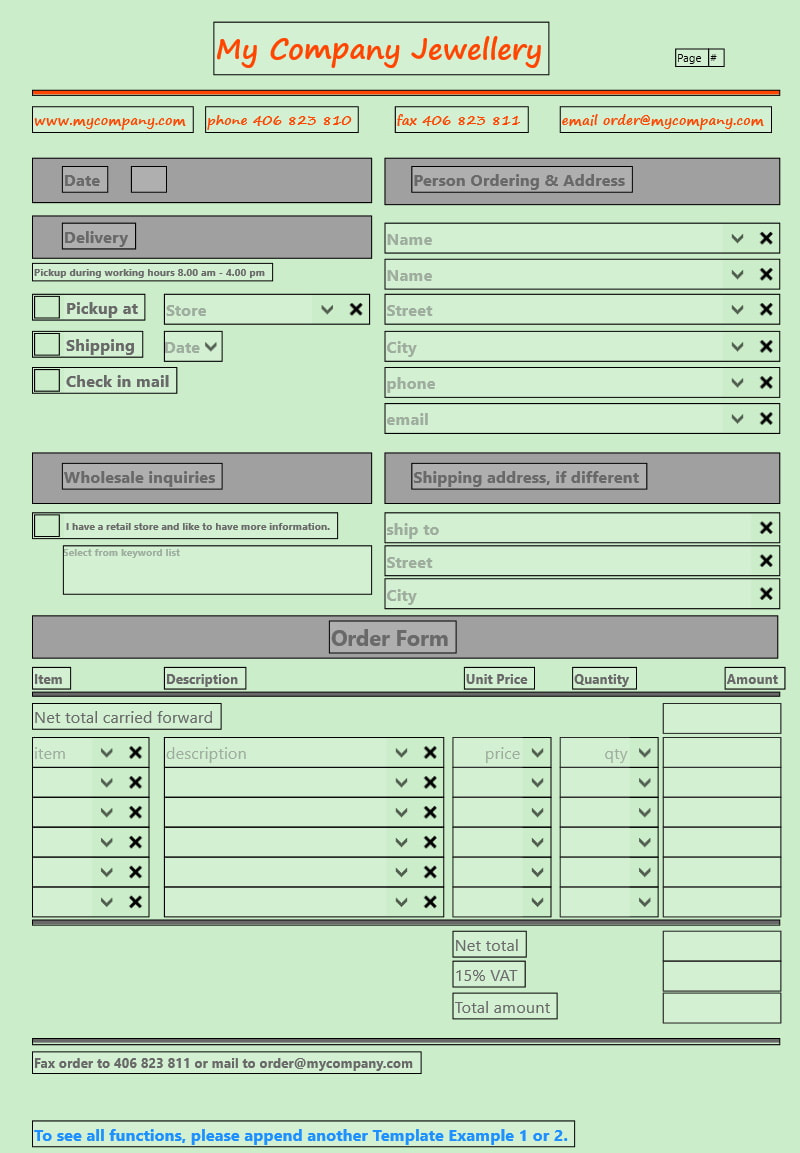
Order form for retail stores, traveling salesmen ...
Case 2
Maintenance form for mechanics, craftsmen ...
In this example we demonstrate how to
Entry fields
  • populate the page with entry field of various types
  • automatically naming / numbering the Reports
  • use a keyword list
Database
  • select a record from a XLSX database for customers and merchandise
  • use the calculator for subtotal, VAT and total
  • carry forward subtotals from one page to another
email
  • implement an confirmation email for the customer
  • include Optical Text Recognition (OCR) in an multiline entry field
Picture
Notes
You will need to download the Professional Edition of Tablet Office to take full advantage of all features.
This example is included in the trial software.


​
System requirements
Touch screen PC
​Windows 10/11
Download
More
Test the Order form

​It is included in the trial software.
download

Related links

PRIVACY STATEMENT
CONTACT
END USER LICENSE ARGREEMENT

Product tour

Products
downloads
​purchase

© 2026   by tabletoffice.net - All rights reserved.
​® The names / products are trademarks of their respective owners.